You've decided to collect email addresses on your website and send a newsletter now and then. The form on an Emit site sends addresses to one of two services: Mailchimp or Brevo. You then write and send your emails from there. Which one should you choose?
Short answer: for a small list and an occasional newsletter, either free plan is enough to start. The differences begin when your list grows, or when you want emails to go out on their own (a welcome email, a reminder). In this post we only compare what we checked on their official pricing pages.
We checked prices and limits in November 2026. Both services change them, so check the current state on mailchimp.com/pricing and brevo.com/pricing before you decide. Prices are shown in US dollars.
The biggest difference: what gets counted
- Mailchimp charges by the number of contacts on your list. How many emails you can send a month depends on that: on Essentials up to 10 times your contact count, on Standard 12 times.
- Brevo charges by the number of emails sent per month. Each tier also comes with a number of contacts.
In practice: with a big list you rarely email, look at contacts. With a small list you email often, look at emails sent.
Free plans
Mailchimp Free:
- up to 250 contacts,
- up to 500 emails a month, at most 250 a day,
- one user and one list (audience),
- the Mailchimp logo stays in your emails and can't be removed,
- email support only for the first 30 days, then the help center,
- when you go over a limit, sending is paused.
Brevo Free: the pricing page says "Free forever, no credit card needed". We couldn't verify the free plan's exact sending limits on their page, so we don't list them here. Check them on brevo.com/pricing before you choose.
The cheapest paid plans
| Mailchimp Essentials | Brevo Starter | |
|---|---|---|
| Price | $13 a month for the first 12 months (50% promotion); the regular price after that wasn't shown on the page | $9 a month, or $97 a year with annual billing |
| What's counted | contacts | emails sent |
| Included | send up to 10 times as many emails as you have contacts | 5,000 emails a month and 500 contacts |
| Service logo in emails | can be removed | stays, unless you add "Remove Brevo logo" ($12 a month) |
| Automation | yes, flows of up to 4 steps | no, only from the Standard plan |
| Other | 3 users, A/B testing, pop-up forms, 24/7 email and chat support | "MCP for ChatGPT & Claude" |
Brevo's next plan is Standard ($18 a month or $194 a year): it adds marketing automation, A/B testing and advanced reporting, and logo removal is included.
With Brevo, more emails a month also means more contacts: the 10,000-email tier gives you 1,500 contacts, the 15,000-email tier 2,500.
Three examples
A salon with 200 addresses and one newsletter a month. That's 200 emails a month. It fits Mailchimp Free (up to 250 contacts, up to 500 emails). For Brevo Free, check the current limits on their page. The only difference your clients see is the service's logo at the bottom of the email.
Holiday apartments with 400 addresses and two emails a month. That's 800 emails a month. Mailchimp Free doesn't cover 400 contacts (the limit is 250), so you'd need a paid plan. Brevo Starter at $9 a month covers both 400 contacts (500 included) and 800 emails (5,000 included).
A shop with 2,000 addresses and two emails a month. That's 4,000 emails a month. At Brevo, Starter's base tier (5,000 emails) allows 500 contacts, so you'd need a higher tier: 2,500 contacts only come with 15,000 emails a month. At Mailchimp, the price rises with your contact count. At this list size both services need a tier above the cheapest one, so compare prices in the calculators on their pricing pages.
Other differences that can decide it
- Automation on the cheapest paid plan. If you want new subscribers to get a welcome email automatically, Mailchimp has it from Essentials, Brevo only from Standard.
- The logo in your emails. At Mailchimp it goes away on the first paid plan. At Brevo it stays on Starter unless you pay extra, and removal is included on Standard.
- Payment. Mailchimp takes cards, PayPal and direct debit in some countries. Serbian dinars (RSD) aren't among its currencies.
- Language and support. Mailchimp's website is in English, Spanish, French, Portuguese, German and Italian, and phone support is English only. Brevo lists English, French, German, Spanish, Italian and Portuguese. Serbian isn't among either site's languages.
How both connect to Emit
On an Emit site the connection works the same for both services. In the left menu, under Settings, click Newsletter, then:
- In CRM Provider, choose Mailchimp or Brevo.
- Create an API key at the chosen service and paste it into the API Key field. The How to find your API key box takes you to the right page.
- Click Fetch Lists and choose the list in List / Audience.
- Click Connect.
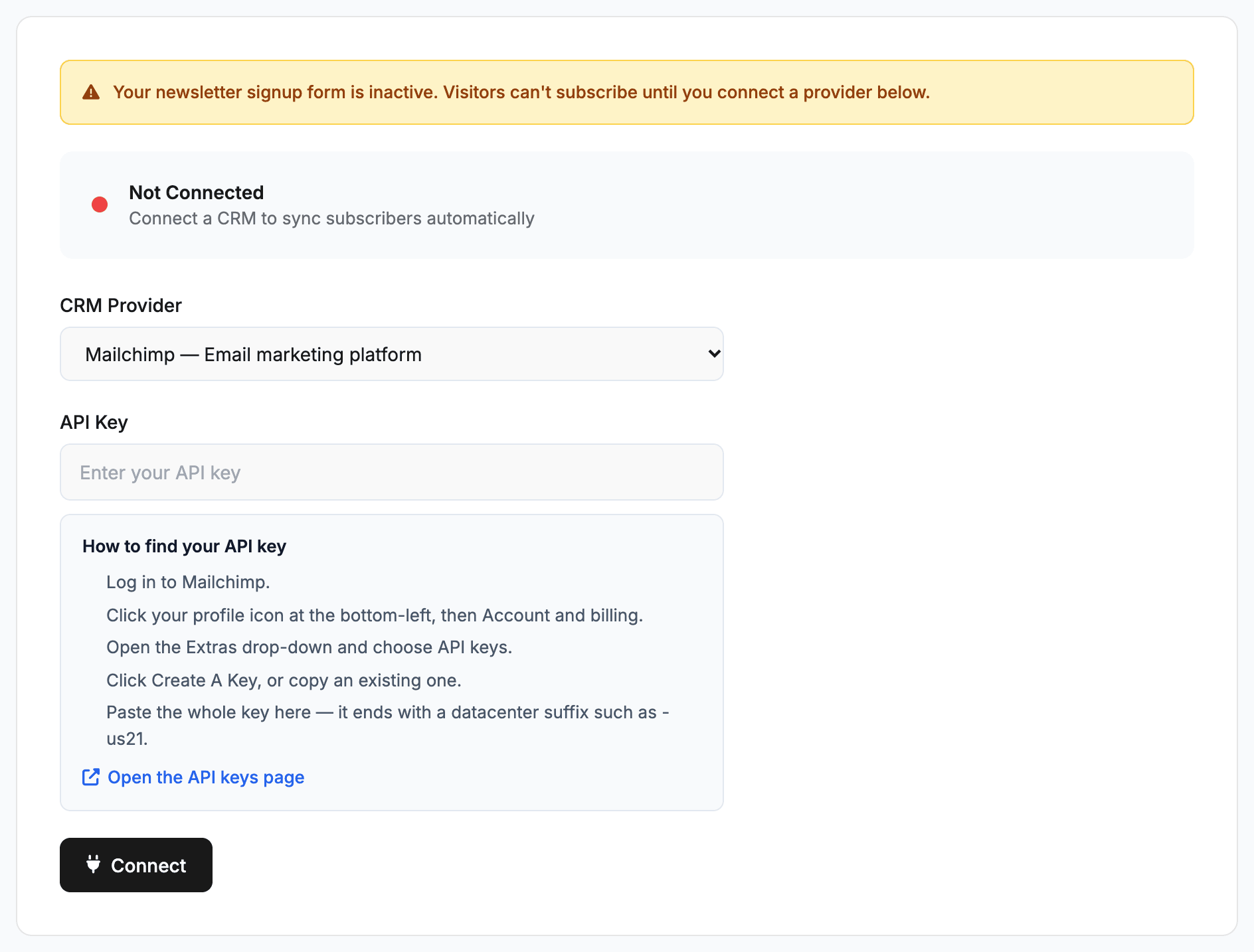
The full walkthrough, including putting the form on your site, is in A newsletter on your website: connecting Mailchimp or Brevo.
What Emit does, and what the service does
- Emit takes the sign-up from the form on your site and immediately adds the address (and the name, if the visitor enters one) to the list you chose. Emit doesn't keep its own copy of the list and doesn't send newsletters.
- Mailchimp or Brevo keeps the list, sends the emails, adds the unsubscribe link and keeps track of who unsubscribed. If someone unsubscribed before, the service may refuse to add them again from your site. That visitor then sees a message that the sign-up didn't go through.
That's also why switching services later is possible, but your list stays in the old one. Before switching, export your contacts from one service and import them into the other, and only then click Disconnect on Emit and connect the new one.
How to choose
- Small list, occasional newsletter: start with either free plan. Mailchimp Free is clearly capped at 250 contacts and 500 emails a month.
- A list of a few hundred addresses, sending now and then: Brevo Starter is the cheaper way in, but the logo stays and there's no automation.
- You want an automatic welcome email on the first paid plan: Mailchimp Essentials.
- A list of several thousand addresses: compare both calculators with your own number of contacts and emails a month.
What to send once your list is running is covered in An email list for a small business. And if you're wondering why Brevo lists MCP with Starter, we explain it in What is MCP and why it matters for your website.