Until now, working with an AI assistant looked like this: you ask ChatGPT to write the text for your prices page, it writes it, you copy it, open your site, paste it, fix the formatting and publish. The assistant is clever, but it can't see your site and can't do anything in it.
MCP changes that. With your permission, the assistant can read what's on your site and make the change where it belongs. You say what you want and review the result.
In this post we explain MCP in plain words, what it isn't, the risks, and what it looks like on Emit.
What MCP is
MCP (Model Context Protocol) is an open standard published by Anthropic in 2024. It defines how an AI assistant, such as ChatGPT or Claude, can use tools and data from another service.
The easiest way to picture it is a power socket with the same shape everywhere:
- The service (your website, calendar, shop) provides the "socket": a list of actions someone outside may perform, e.g. "read pages", "create a new page", "change an order's status".
- The assistant plugs into that socket, but only once you allow it.
- Because the shape is the same everywhere, one assistant can work with many different services, without a separate arrangement with each.
When you write "add a page with summer prices", the assistant sees there's a tool for creating a page, calls it with the text it wrote, and tells you what it did.
What MCP isn't
There's a lot of confusion around AI, so it matters what MCP doesn't do:
- It isn't a plugin you install on your site. The service has to support MCP (on Emit it's built in), and you just add the connection in your assistant.
- It isn't open access to everything. The assistant only sees the tools the service offers, and only the ones you've granted.
- It doesn't train AI on your data by itself. MCP lets the assistant carry out a task while you chat. Whether the assistant's provider uses your conversations to train its models depends on your account settings with that provider (ChatGPT, Claude), so check them there.
- It isn't a replacement for your review. An assistant can get a text, price or tone wrong, just like a person helping you. That's why it matters what arrives as a draft; more on that below.
Why it matters to a small business owner
The difference isn't that AI writes better. It's that it does the work instead of only suggesting it:
- Less copying. "Translate the Services page into English" becomes one sentence instead of half an hour of copying field by field.
- A view of the whole site at once. "Which pages have no SEO description?" The assistant reads every page and gives you a list.
- Routine jobs. "Add the product Linden Candle, 1,900 dinars, category Candles." or "Add Prices to the main menu after Services."
- Working from your phone. Write a message to the assistant while you wait in a queue, and review the change later.
Risks and control
Giving any tool access to your site is a serious matter, so the questions to ask are always the same:
- What exactly may it do? A good service shows this as a list of permissions before you click "Allow".
- What may it never do? Your password, account email, domain and account deletion should be out of reach for every app.
- What goes live immediately, and what waits for you? New content is safest arriving as a draft.
- How do you revoke access? One click, immediately, no waiting.
What it looks like on Emit
An Emit site has a built-in MCP connector. You connect it to ChatGPT or Claude with one address, and the step-by-step setup is in Edit your site by chatting with ChatGPT or Claude. Here's a short version of what happens and what you control.
The permission screen
When you connect an assistant, Emit shows a sign-in and permission screen. It says which app is asking for access, to which site, and exactly what it will be able to do:
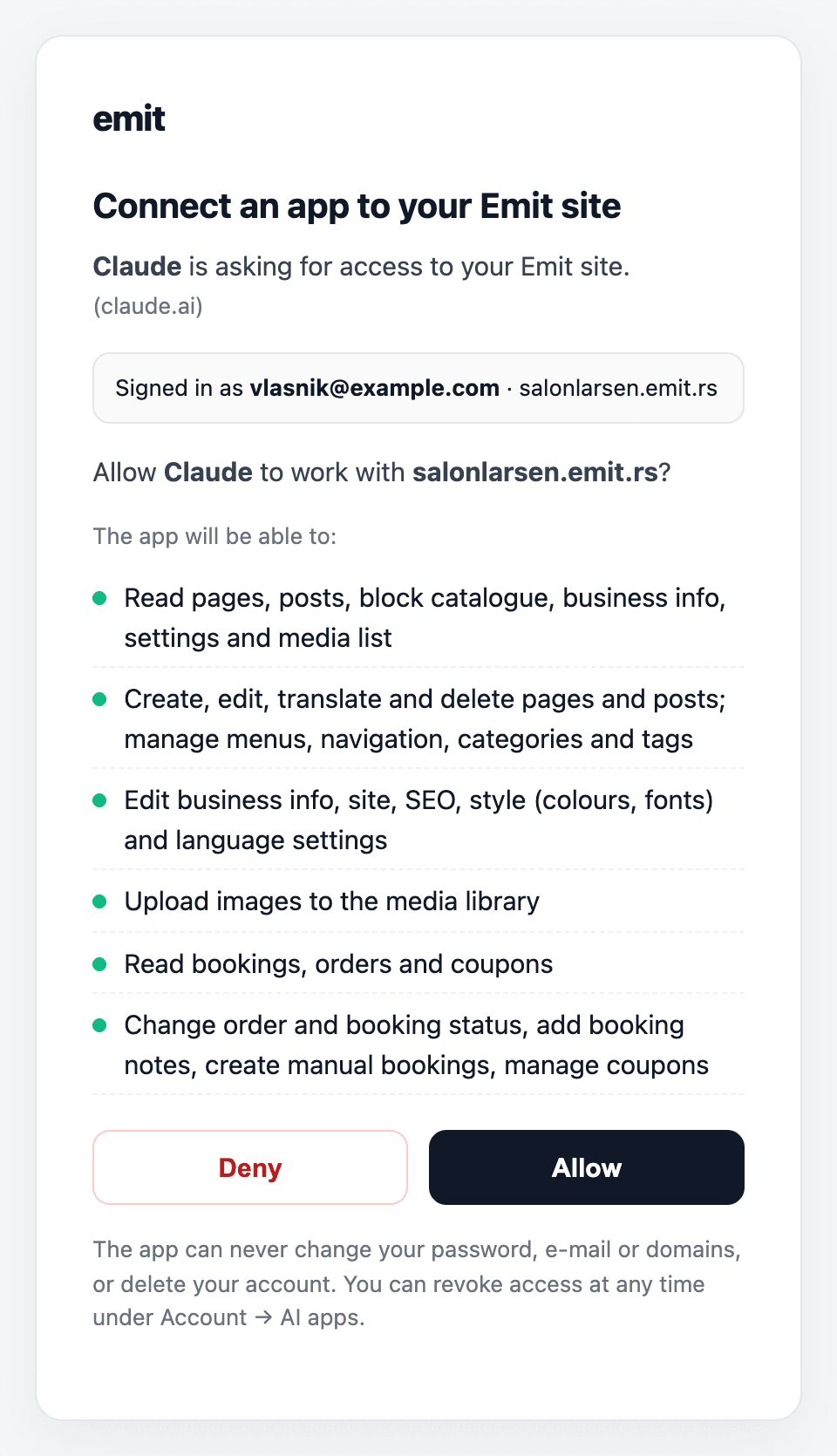
Permissions come in groups: reading the site, content, settings, media, and separately reading and changing bookings, orders and coupons. An app without a permission can't see the tools in that group, so it can't even try them.
What arrives as a draft, and what applies straight away
- New pages, posts and products arrive as drafts. You see them in the editor, polish them and publish them yourself.
- Edits to existing, published pages apply straight away. So for bigger changes ask the assistant: "show me the proposal first, then make the change".
- Deleting a page moves it to the Trash, where you can restore it, and the old address automatically redirects to the home page.
What AI on Emit can never do
There simply is no tool for these, so no app can call one:
- change your password or email, touch domains or delete the account,
- change the code and design of blocks (it works with content only),
- publish a site that is switched off,
- access another site,
- delete orders or bookings, or change payment settings.
Revoking access
In the left menu, under Settings, click Account, then choose the AI apps tab at the top. Under Connected apps, click Disconnect next to the app. Access stops immediately.
One important note: changing your Emit password does not revoke app access, because apps don't use your password. If you suspect misuse, do both: change the password and disconnect the apps.
In short
- MCP is a standard "socket" through which an assistant, with your permission, does real work in another service.
- It isn't a site plugin, it isn't open access to everything, and it doesn't replace your review.
- Before allowing, read the list of permissions and grant only the ones you need.
- On Emit, new content arrives as a draft; edits to published content apply straight away.
- Revoke access in Account → AI apps → Disconnect, with no waiting.
Every permission and limit is also described in the knowledge base: Managing access, limits and security.