You have two thousand Instagram followers and post that three slots have opened up for Saturday. How many people see it? You don't know, and you don't decide. The network's algorithm does, and it can change the rules overnight.
An email list works differently. People who signed up get your message in their inbox, and the list is yours: you can move it, export it and still use it in five years, whatever happens to any network.
In this post we go through three things: how to collect addresses on your website, what to send and how often, and how to do it fairly, with people's consent.
Why a list, not just social media
- The list is yours. Followers belong to the network; the addresses on your list are yours and you can take them to another service.
- The message arrives. Email doesn't depend on whether someone opened an app at that exact hour.
- People asked for it. Whoever signed up said "let me know". That's a different audience from someone who saw you by chance in their feed.
- It's measurable. You see how many people opened the message and who clicked the booking link.
Social networks still make sense for new people to discover you. The list is for people who already have.
How to collect addresses on your website
Emit has a ready-made newsletter form for this, which can sit in the footer of every page or as a separate block on a page. The site itself doesn't store the addresses: the form sends them to the email service you connect, Mailchimp or Brevo, and people are added to your list there straight away.
Until a service is connected, the form doesn't collect sign-ups, and the editor warns you with a yellow notice. How to connect one and add the form to a page, step by step, is in Newsletter on your site: connecting Mailchimp or Brevo.
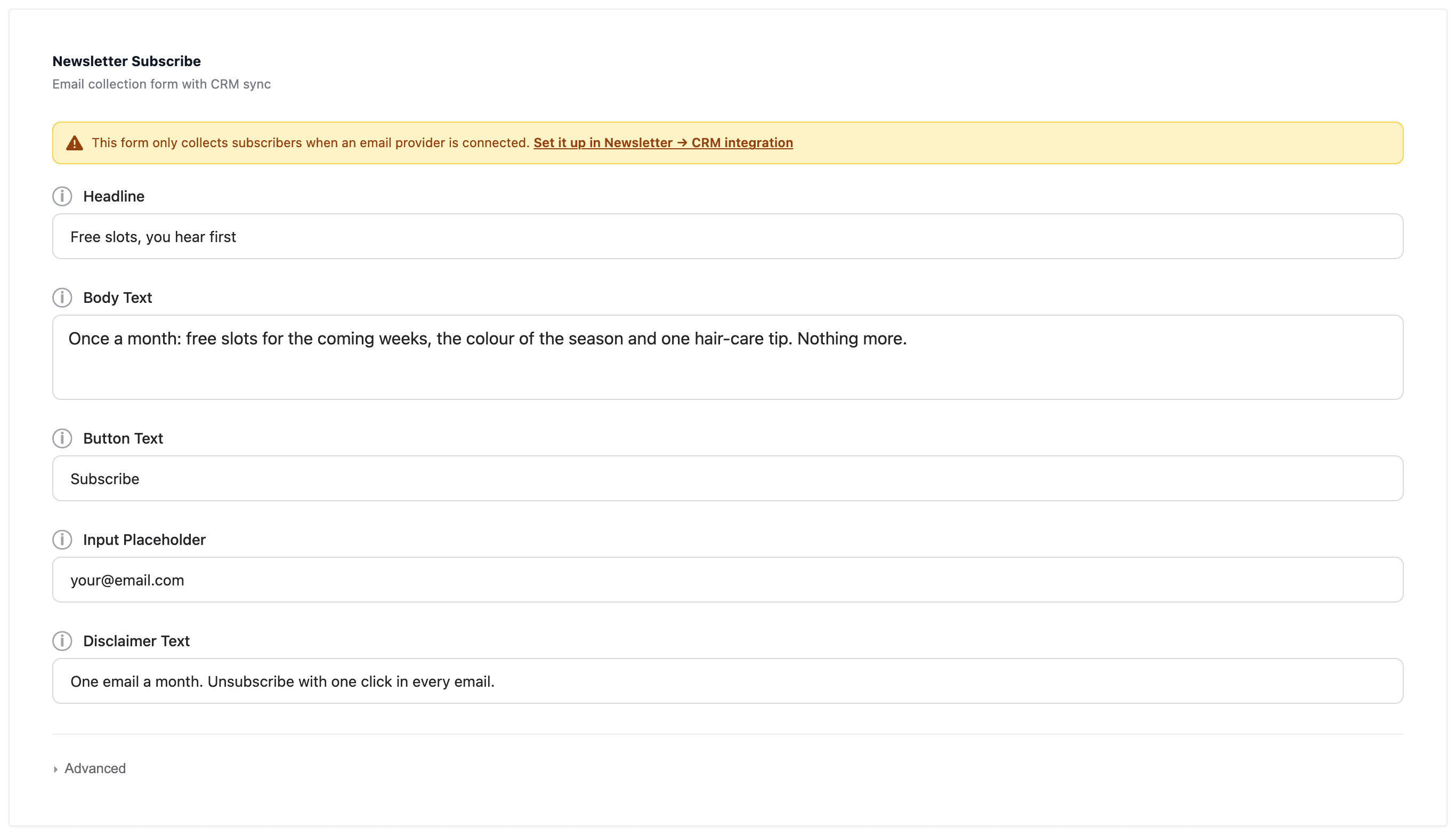
Three of the block's fields matter more than they look:
- Headline should say what people get, not "Subscribe to our newsletter". For example: "Free slots, you hear first".
- Body Text should say concretely what you send and how often.
- Disclaimer Text (the small line under the field) is the right place for your promise: how often you write and that unsubscribing takes one click.
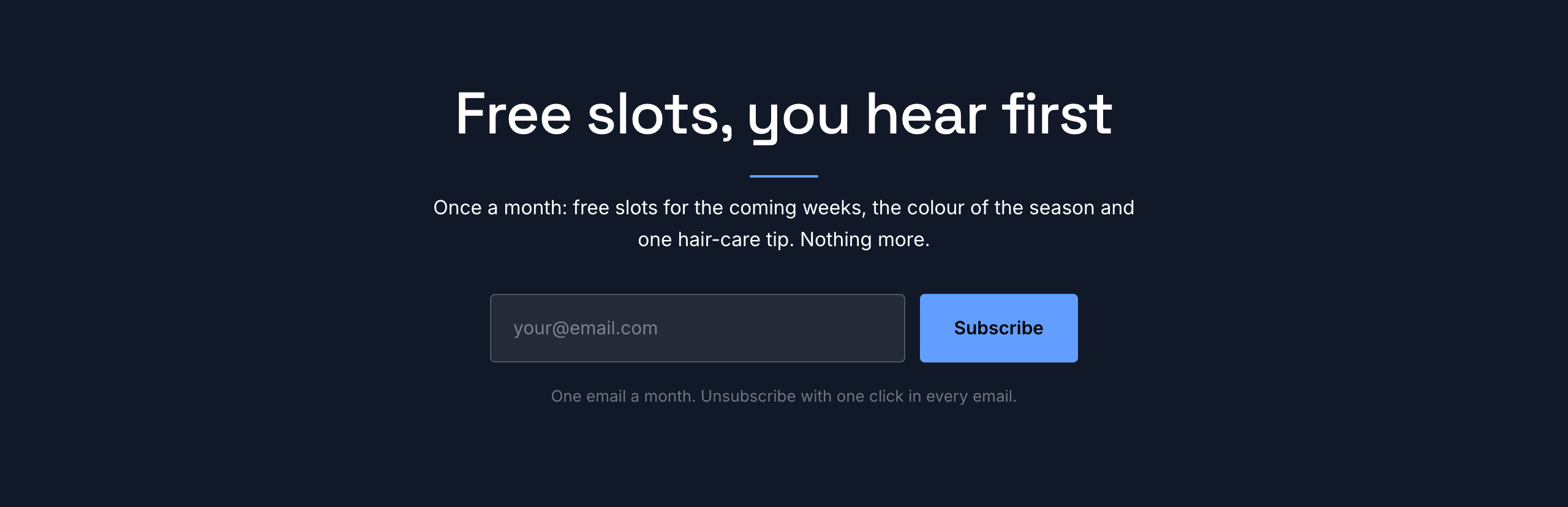
This is how it looks on the site:
What to send
The rule is simple: send what someone would want to be on the list for, not what you want to sell. A few examples:
Salon
- free slots for the next two weeks, with a booking link,
- a new service or seasonal treatment,
- one practical tip (how to make colour last longer).
Café
- the weekly menu or new seasonal drinks,
- events: live music, a quiz, a tasting,
- opening hours over the holidays.
Apartment or holiday rental
- free dates for the season, before you publish them elsewhere,
- an offer for guests who have already stayed with you,
- what's new in the area (a festival, a new trail, the season opening).
Shop
- a new collection or products back in stock,
- a sale with a clear end date,
- a product story: how it's made, where the material comes from.
How often
There's no single right number, but there are two rules:
- Regularly. Once a month is a good start for most small businesses. A list you haven't written to in six months goes "cold", and people forget why they signed up.
- As often as you promised. If the form says "once a month", don't write every week.
The subject line
The subject line decides whether the message gets opened. A few tips:
- Specific, not general. "3 free slots this Saturday" instead of "News from the salon".
- Short. On a phone only the start of the subject is visible.
- No fake urgency or capitals. "URGENT!!!" lowers trust and makes it more likely to land in spam.
How to measure
After every send, Mailchimp and Brevo show a report: how many people opened the message, who clicked which link and how many unsubscribed. You don't need to follow every number; two questions are enough:
- Do people click on what matters to you (the booking link, a product)?
- Do people unsubscribe after a certain kind of message? That's a sign you're sending something they don't want.
Consent: fair and safe
This isn't legal advice, but a few basic rules always apply:
- People sign up themselves. Don't add addresses from your phone, business cards or old orders of people who didn't sign up to the list themselves.
- Say in advance what you'll send. That's why the form text should say what you write about and how often.
- Unsubscribing must be easy. Mailchimp and Brevo add an unsubscribe link to every message automatically; don't hide it.
- Treat the list as confidential. Don't share it with anyone.
In Serbia, collecting email addresses falls under the Law on Personal Data Protection. For specifics, e.g. what exactly your privacy policy should say, check your email service's guidance or ask a lawyer.
In short
- Connect Mailchimp or Brevo and add the newsletter form (in the footer and/or as a block on a page).
- The form's headline says what people get, and the disclaimer says how often you write.
- Send what people would want to be on the list for: free slots, offers, news.
- Write regularly, as often as you promised.
- Specific, short subject lines.
- Watch clicks and unsubscribes in the service's report.
- Only people who signed up themselves, with an easy way out.