A salon owner hears from a friend: "Build your site with Lovable, you just tell it what you want and it's done in five minutes." She tries it, and it's true: after a few messages there's a nice page with the salon's name, a photo and a "Book" button. The question is what happens tomorrow, when she needs to change a price, when a client actually wants to book a slot, when a guest from abroad wants to read the site in English.
This post is a fair look at what Lovable does well, what a small business needs from its website every day, and where the difference lies between a tool for building apps and a ready-made business website.
We checked the Lovable facts on 9 November 2026 in their official documentation, with links at the end of each section. Their offer changes often, so check the current state with them before you decide.
What Lovable is
Lovable is a tool where you build an app by chatting with AI: you describe what you want, it writes the code and shows the result. What you get is a real software project (React code), which you keep changing through messages or, on paid plans, by editing the code by hand.
What Lovable does well
To be fair, several things often listed as weaknesses are no longer true:
- A fast first result. For a prototype, a landing page or an idea you want to show someone, it's hard to be faster.
- Hosting is included, and the plan doesn't cap visitors or bandwidth. (Free apps created from 13 May 2026 are limited to 1,000 server requests per project per 10 seconds.)
- Google sees the content. New apps since 13 May 2026 render pages on the server, and older ones get automatic pre-rendering for search engines and AI bots. Meta tags and robots.txt are created automatically, and an SEO review is available on all plans.
- Analytics is built in on all plans, cookie-free: visits, page views, duration and traffic sources.
- SSL is automatic when you connect your own domain.
- On paid plans you also get 50,000 transactional emails a month.
Sources: hosting, SEO, analytics, email, FAQ.
How you pay: credits
Lovable charges in credits. The Free plan gives 5 credits a day, at most 30 a month. Pro starts at $25 a month ($21 billed annually) for 100 credits, and Business at $50 ($42 billed annually).
Credits are used by building and editing, by chatting with the AI, by Cloud (your app's backend), by AI features inside your app and by connected services. In their documentation, as an illustration, the message "Make the button gray" costs 0.50 credits and "Build a landing page with images" 2 credits.
For a small business owner that means: every small change you ask the AI for has a price. A new haircut price, new opening hours, a new photo. On paid plans you can also edit the code by hand, but that's a job for someone who knows React.
What a small business website needs every day
A website isn't finished when it's published. Here's what a salon, holiday rental, restaurant or small shop actually does with its site after the first week:
- Changes prices, opening hours and text themselves, quickly and without a cost per edit.
- Has its own domain (
www.yourbusiness.com), not the tool's address. - Takes bookings or orders: a hair appointment, a night in an apartment, an ordered product.
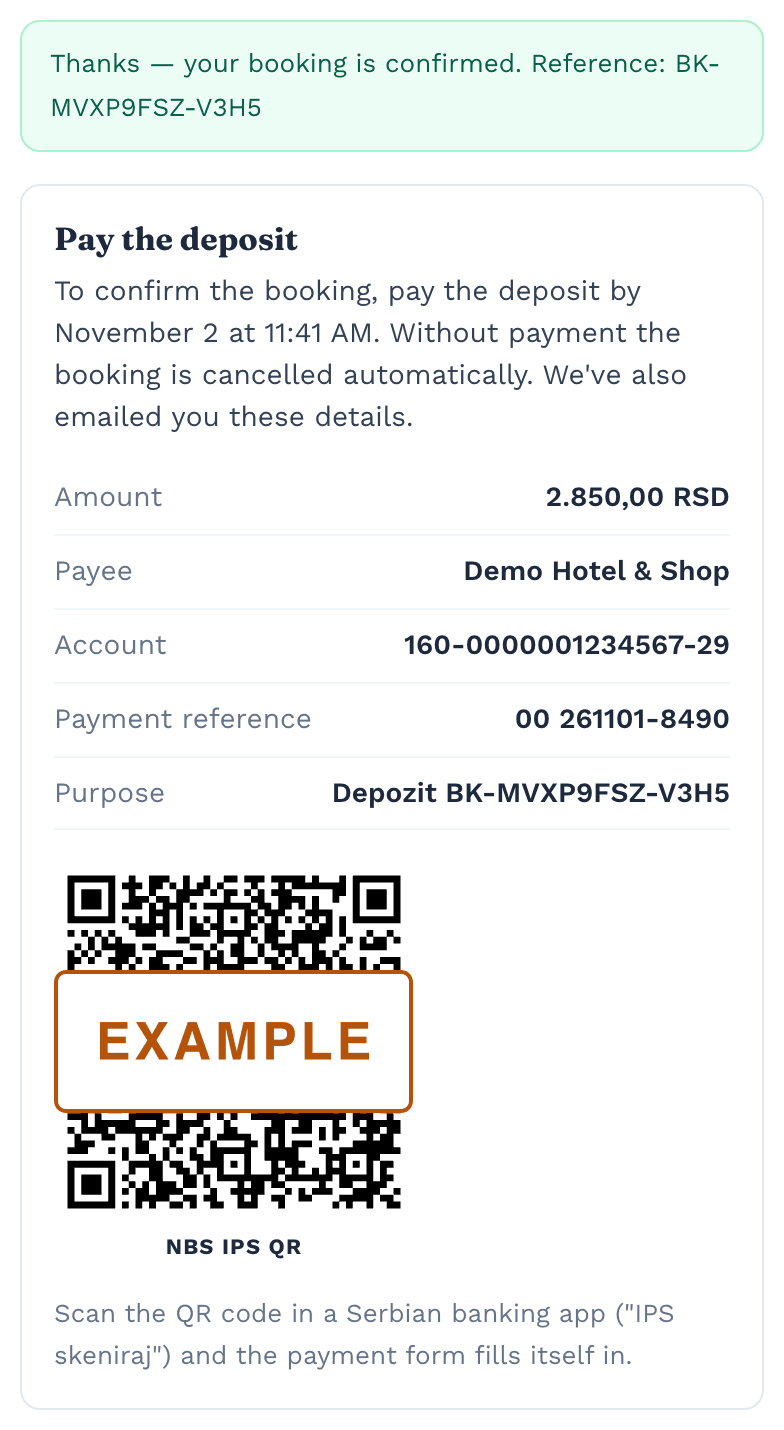
- Gets paid the way local customers pay. In Serbia, for example, that's cash on delivery or bank transfer, easiest with an IPS QR code from a banking app.
- Has the site in two languages, for guests and clients from abroad.
- Receives form messages at the right address, with spam protection.
- Shows a cookie banner when using Google Analytics or similar tools.
- Has someone to ask when something doesn't work.
Lovable can build some of these, but you have to ask for them in messages, piece by piece. In their documentation we did not find built-in appointment booking, a shop for physical products with a cart, a multilingual site feature (only their interface is multilingual) or a cookie banner. Built-in payments exist on paid plans, but they're meant for digital products and software (subscriptions or one-time purchases); on the Free plan you can connect your own Stripe account.
A few more things worth knowing:
- Your own domain needs a paid plan. For free you get an address on
lovable.app. - When credits run out, the published site stays up, but apps that use the backend or AI can pause. Backend usage grows with the number of visitors. Free apps may be unpublished after about 12 months of inactivity.
- Data and AI training: on the Free and Pro plans, data may be used for AI training from 9 September 2026 unless you opt out. A Data Processing Agreement comes with the Business and Enterprise plans.
Sources: domain, hosting and credits, FAQ.
Side by side
| What you need | Lovable | Emit |
|---|---|---|
| A quick first version | Yes, by chatting with AI | Yes: Emit AI writes the first version, or you start from a ready template |
| Changing a price or text | A message to the AI (uses credits) or by hand in code on a paid plan | In the visual editor: click and change |
| Own domain and SSL | On a paid plan, SSL automatic | You connect it in the settings (Custom Domain), SSL automatic |
| Hosting and Google | Included, server rendering | Included, Cloudflare CDN, automatic sitemap and robots.txt |
| Analytics | Built in, cookie-free | Google Analytics 4, with a cookie banner |
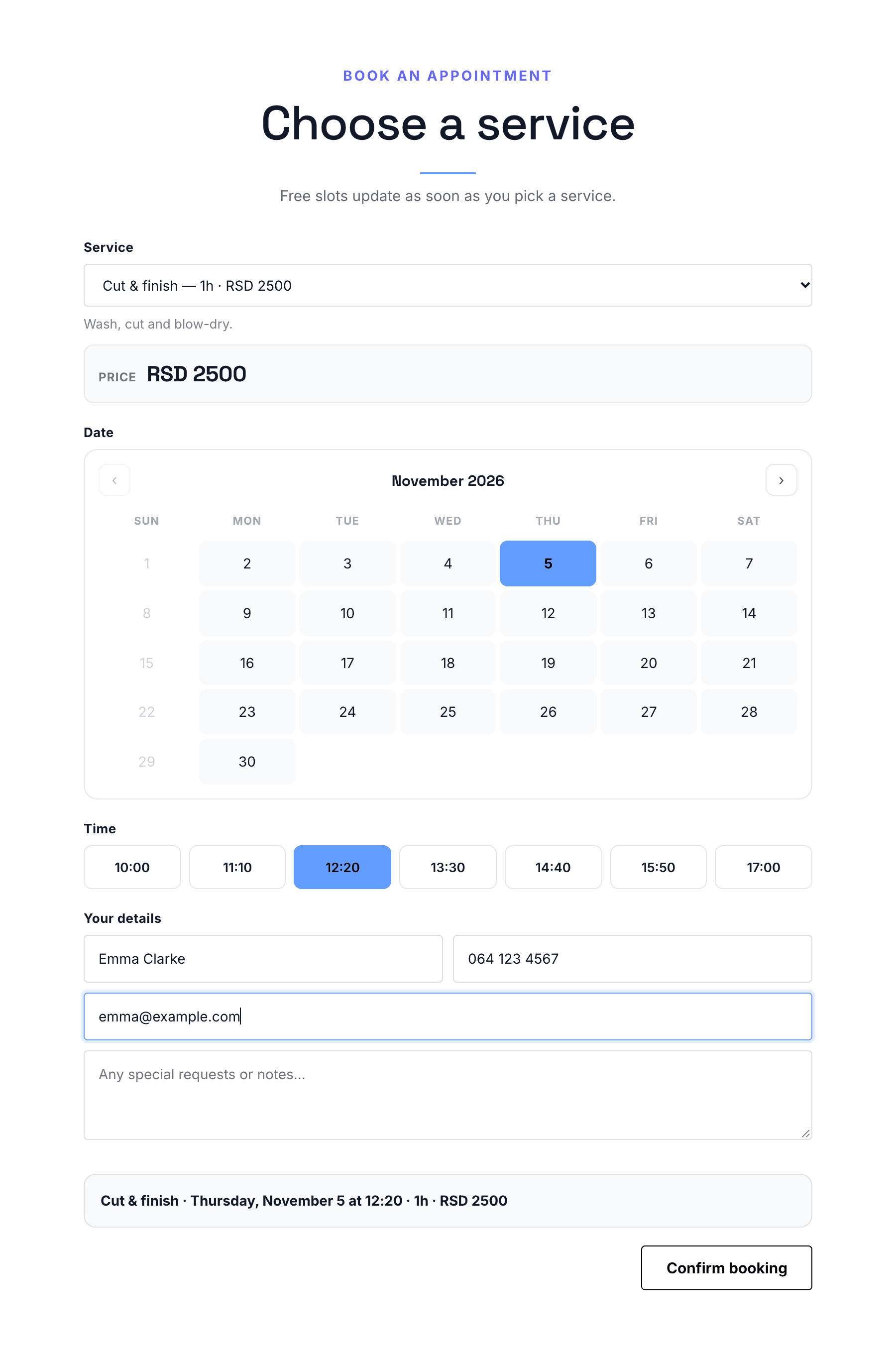
| Appointment booking | Not found in the docs; you'd build it with messages | Built in: services, staff, working hours, reminders, deposits |
| Accommodation bookings | Not found in the docs | Built in: calendar, prices per weekday, iCal sync |
| Shop | Payments for digital products and software | Physical products, cash on delivery or bank transfer with an IPS QR code, 0% commission |
| Two languages | Not found as a site feature | Built in, with /en/ addresses |
| Cookie banner | Not found in the docs | Built in |
When Lovable is the better choice
Lovable is excellent when what you need isn't a business website but an app:
- you have a product idea (a tool, a platform, a calculator) and want to try it quickly,
- you need something no ready-made website does, specific to your business,
- someone on your team can work with code and maintain it.
In those cases the flexibility of code is a big advantage, and credits are the price of speed.
When Emit is the better choice
Emit is built for a small business website that has to work every day:
- Edits in the visual editor. Click a heading, a price or a photo and change it. No credits per edit.
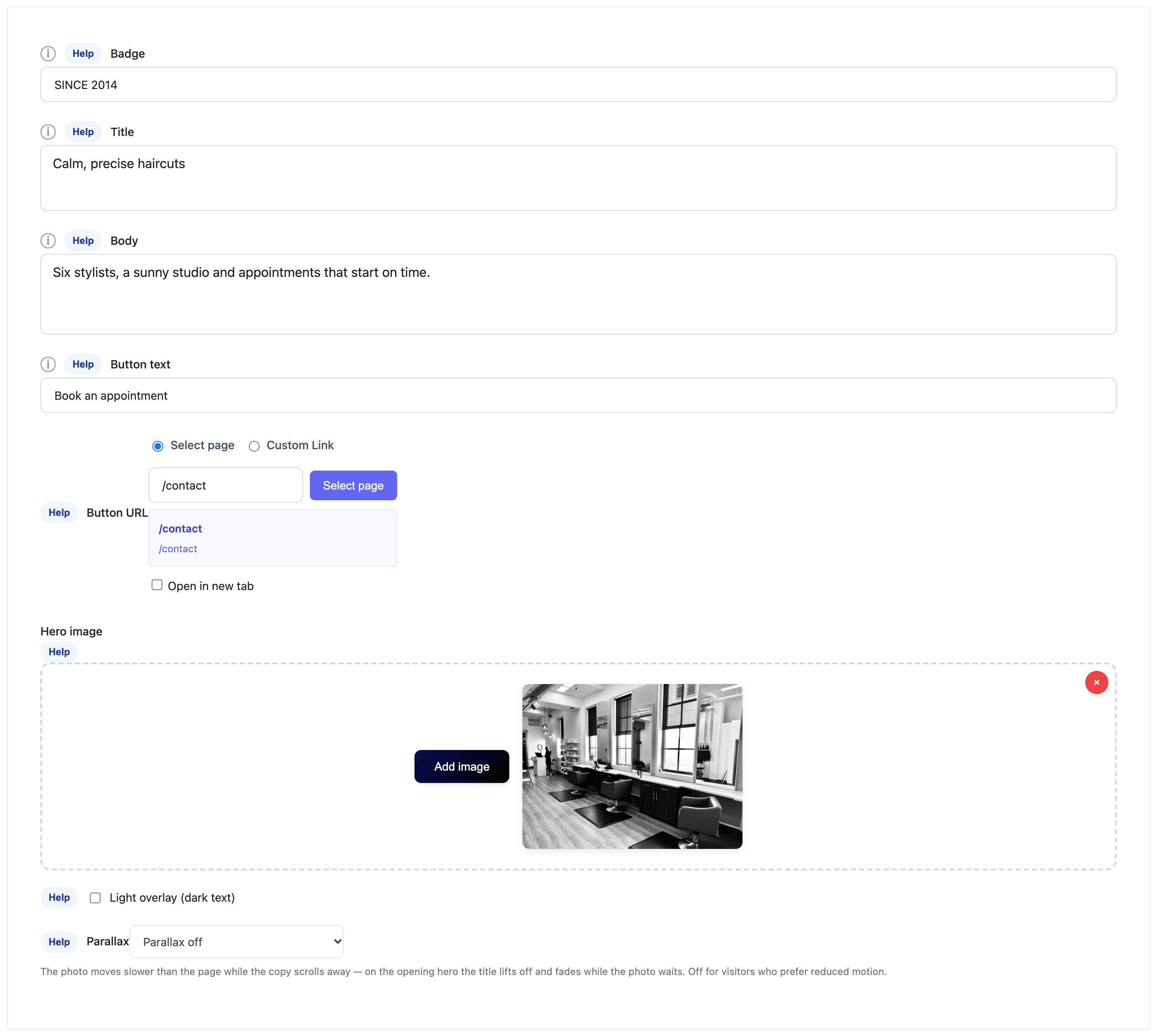
- Booking is part of the site. Services, durations, staff, working hours, email confirmations and reminders work without extra programming.
- Payment the way people in Serbia pay. The shop works with cash on delivery and bank transfer, and a guest pays a booking deposit by scanning an IPS QR code. Emit doesn't offer online card payments; you confirm bank transfers in the admin.
- Serbian and English with separate
/en/addresses, a cookie banner, forms that reach the right inbox, a sitemap and an automatic llms.txt. - AI when you want it. Emit AI writes the first version of your site, and Emit pays for it. Later you can connect your own ChatGPT or Claude through MCP and ask for changes in plain language. New pages, posts and products arrive as drafts you review before publishing, and the AI never touches your account, password or domains. That work runs through your own ChatGPT or Claude account.
- Support in Serbian and English, answered by a person.
How to start on Emit
- Create an account at emit.rs/en/register. The introductory period is free, no credit card.
- Follow Your first website step by step: Emit AI writes the first version, or you pick a template from the gallery.
- If you'd like to edit your site by chatting, connect your assistant with AI connector: ChatGPT and Claude.
In short
- Lovable is excellent for apps and prototypes; the first result is fast, and hosting, SEO and analytics are built in.
- For a business website, think about after launch: who changes the prices, and what each change costs.
- Your own domain on Lovable needs a paid plan.
- Booking, a physical-products shop, a two-language site and a cookie banner weren't in their documentation; you'd build them with messages.
- If you need a site with bookings or a shop that you edit yourself, try Emit.
- Offers change fast: check both services' current plans before you decide.