If you've read about SEO lately, you've probably come across the advice "create an llms.txt file, or AI won't find you". It sounds urgent. The truth is calmer: llms.txt is a useful, free extra, but it's not a switch that puts you into ChatGPT's answers.
In this post we explain what llms.txt is, what is actually known about it and what isn't, and what it looks like on Emit, where the file is created for you.
What llms.txt is
llms.txt is a plain text file at yoursite.com/llms.txt. In simple Markdown it holds a short description of the site and a list of the most important pages with links. Think of it as a table of contents, written for AI assistants instead of people.
The proposal was published by Jeremy Howard on 3 September 2024 at llmstxt.org. A second version of the specification came out in August 2026. The rules are short:
- the file sits at the root of the site (or at any path within it),
- the only required part is a top-level heading (H1) with the name of the site or project,
- optionally a short summary follows (in Markdown, a quote line starting with
>), then sections with lists of links.
The specification says agents are expected to view or search it, and that it is meant mainly for answering questions (when an assistant looks something up for a user), not for training models. Pages can also point to Markdown versions of themselves, using rel="alternate" with type text/markdown and rel="describedby", in the page head or an HTTP header.
Who actually reads it
It's worth being precise here, because claims nobody has confirmed are spreading online.
What is known:
- Google's Chrome has an llms.txt check in its Lighthouse tool, in the group of checks for AI agents. It describes llms.txt as "an emerging convention". The check flags an error if the server fails when the file is requested, and if there is no file it marks the check as not applicable, because, quote, "providing the file is optional at the moment".
- OpenAI and Anthropic publish llms.txt files for their developer documentation (developers.openai.com/llms.txt, platform.claude.com/docs/llms.txt).
What is not known:
- None of the big AI companies (OpenAI, Anthropic, Google) has publicly confirmed that their crawlers or assistants read llms.txt when answering users. Publishing their own file doesn't mean they read other people's.
- llms.txt is not a known Google ranking factor. There is no official confirmation that Google Search uses it, and no official statement that it ignores it either.
In short: someone may read it, nobody promises to, and nobody penalises you for not having one.
Does your site need one
Sites with lots of documentation benefit most: software guides, APIs, knowledge bases. There, a tidy list of pages genuinely helps an AI assistant instead of wandering through hundreds of them.
For a salon, restaurant, holiday rental or small shop, llms.txt is a nice extra, not a priority. Things that AI assistants and Google certainly read matter much more:
- clear text on your pages: what you do, where, for whom, at what price,
- correct contact details and opening hours,
- page titles and descriptions for Google (guide: page SEO settings step by step),
- reviews and your Google Business Profile.
We wrote about how AI search picks which businesses to recommend in AI search and small businesses.
Since llms.txt is free and can't hurt, it's good to have one. Just don't expect miracles from it.
What it looks like on Emit
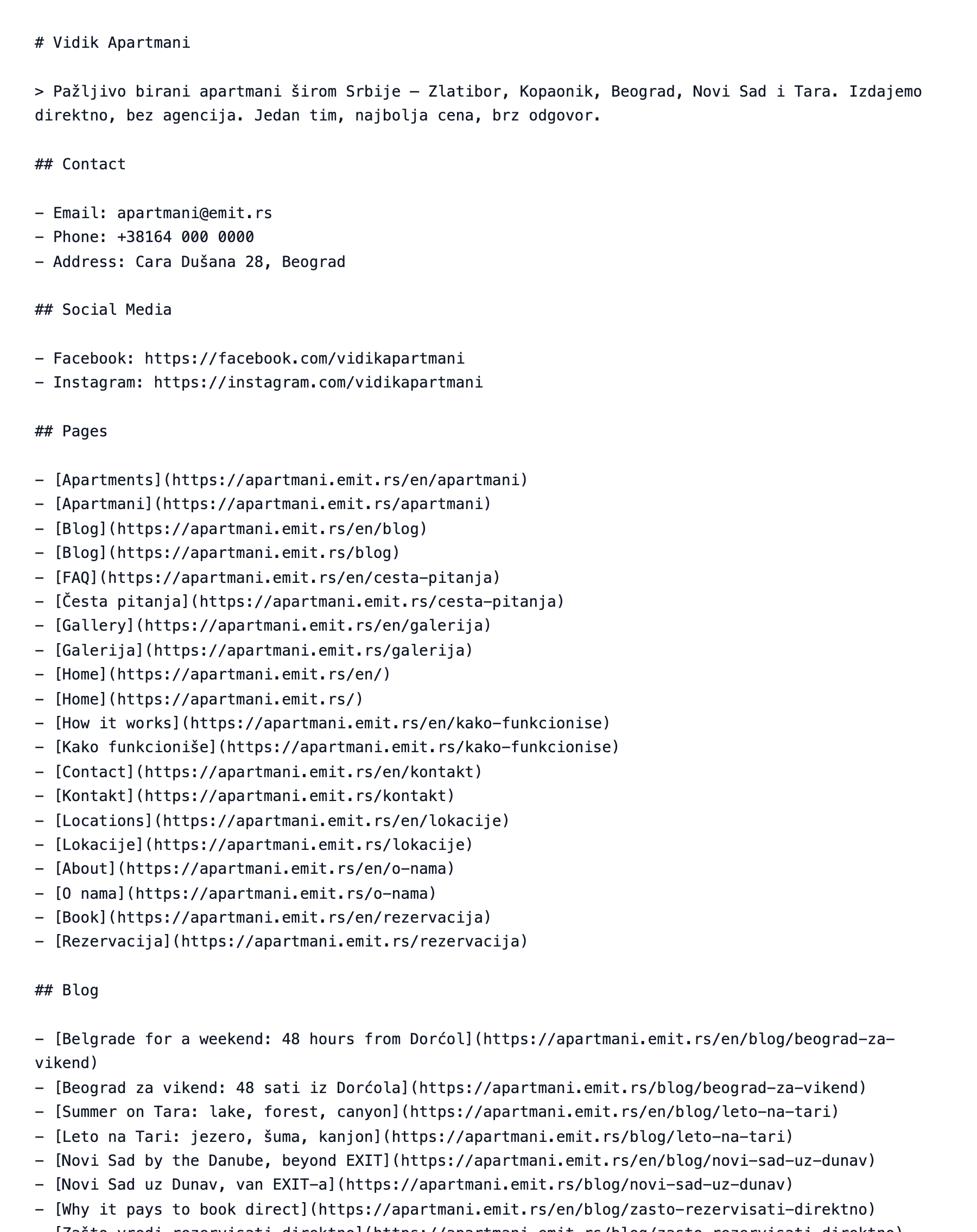
On Emit you don't have to do anything. Every site automatically has an llms.txt at yoursite.com/llms.txt (and the same at /llm.txt). The file is built from your site's content at the moment someone requests it, so it's always up to date:
- the heading is your business name, with a short description of the site below it (from the SEO settings or your business description),
- contact: email, phone and address from your business details,
- social media, if you've entered them,
- every published page and blog post, each with its exact address, including other language versions (
/en/...), - accommodation, services and products, if you have them,
- opening hours and a link to the site map (sitemap.xml).
Drafts don't appear in the file until you publish them. This is the llms.txt of an example apartment site:
The same goes for emit.rs itself: the blog and the industry pages are in our llms.txt, and emit.rs/llms-full.txt holds the full text of all those articles.
Who may read your site: AI bots
More important than llms.txt is whether AI assistants are allowed to read your site at all. That's set in the robots.txt file, and on Emit you change it with switches, without writing any code.
Before you start: log in at emit.rs/en/login. Your site's dashboard opens, with the main menu on the left.

- In the left menu, under Settings, click robots.txt.
- Find the AI bots part. It has two switches:
- Block AI search and assistants: when on, ChatGPT, Claude and Perplexity cannot read or recommend your site when someone asks them. It's off by default, and we recommend leaving it off.
- Block AI model training: when on, AI companies don't use your content to train their models. It's on by default and doesn't affect Google Search.
- Click Save settings.
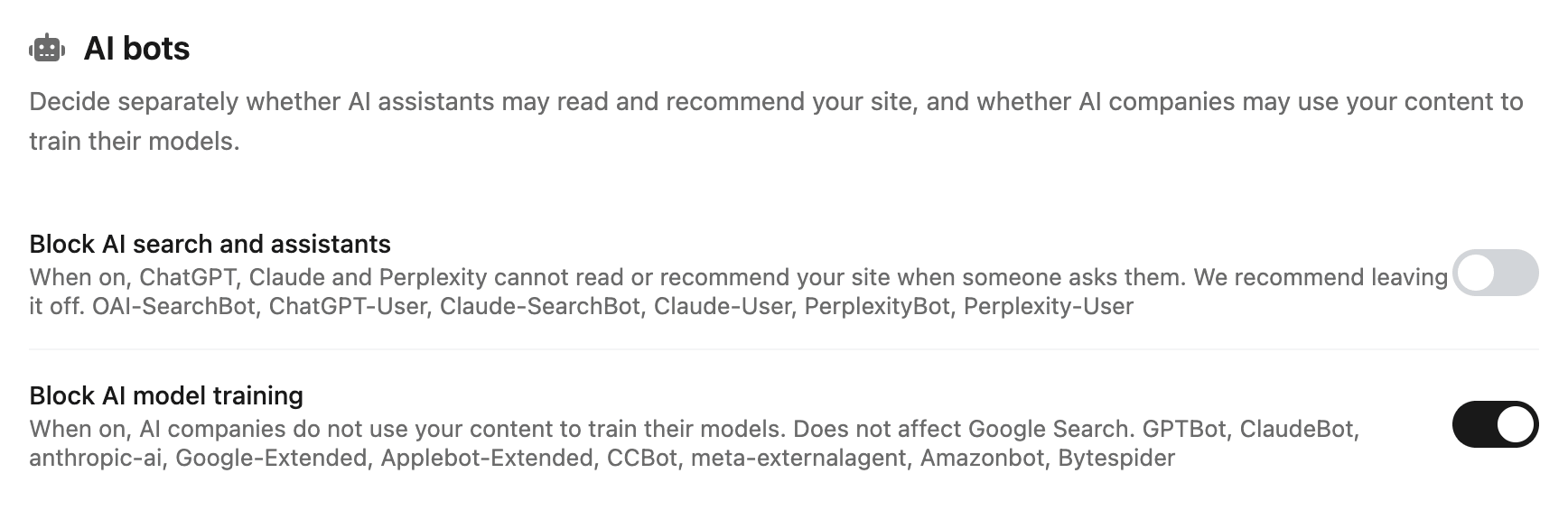
Each switch lists the names of the bots it applies to. Emit also writes your choice as a Content-Signal line in robots.txt, for example Content-Signal: search=yes, ai-input=yes, ai-train=no, so bots that read this newer signal know what you allow.
Unlike llms.txt, robots.txt is a standard that serious bots respect. So if you want AI assistants to recommend you, check that Block AI search and assistants is off.
In short
- llms.txt is a list of your most important pages for AI assistants, in Markdown, at /llms.txt.
- It's not a known ranking factor, and no big AI company has confirmed reading it.
- Documentation-heavy sites benefit most; for a small business it's a nice extra.
- On Emit it's created for you, from published content, with exact addresses in every language.
- What matters more is that AI search isn't blocked: Settings → robots.txt → AI bots.
- Text on your pages, contact details, opening hours and your Google profile still count for the most.