The biggest fear of a host who starts taking direct bookings is a double booking: a guest books a date on your site that someone already took on a platform. Two guests, one apartment, one awkward phone call.
The fix is iCal: a standard calendar format that Booking.com, Airbnb and Google Calendar all understand. The connection goes both ways:
- Export: you send your direct bookings to the platforms so they close those dates.
- Import: you bring the platforms' bookings into your site so those dates close on your side.
Before you start: where things are
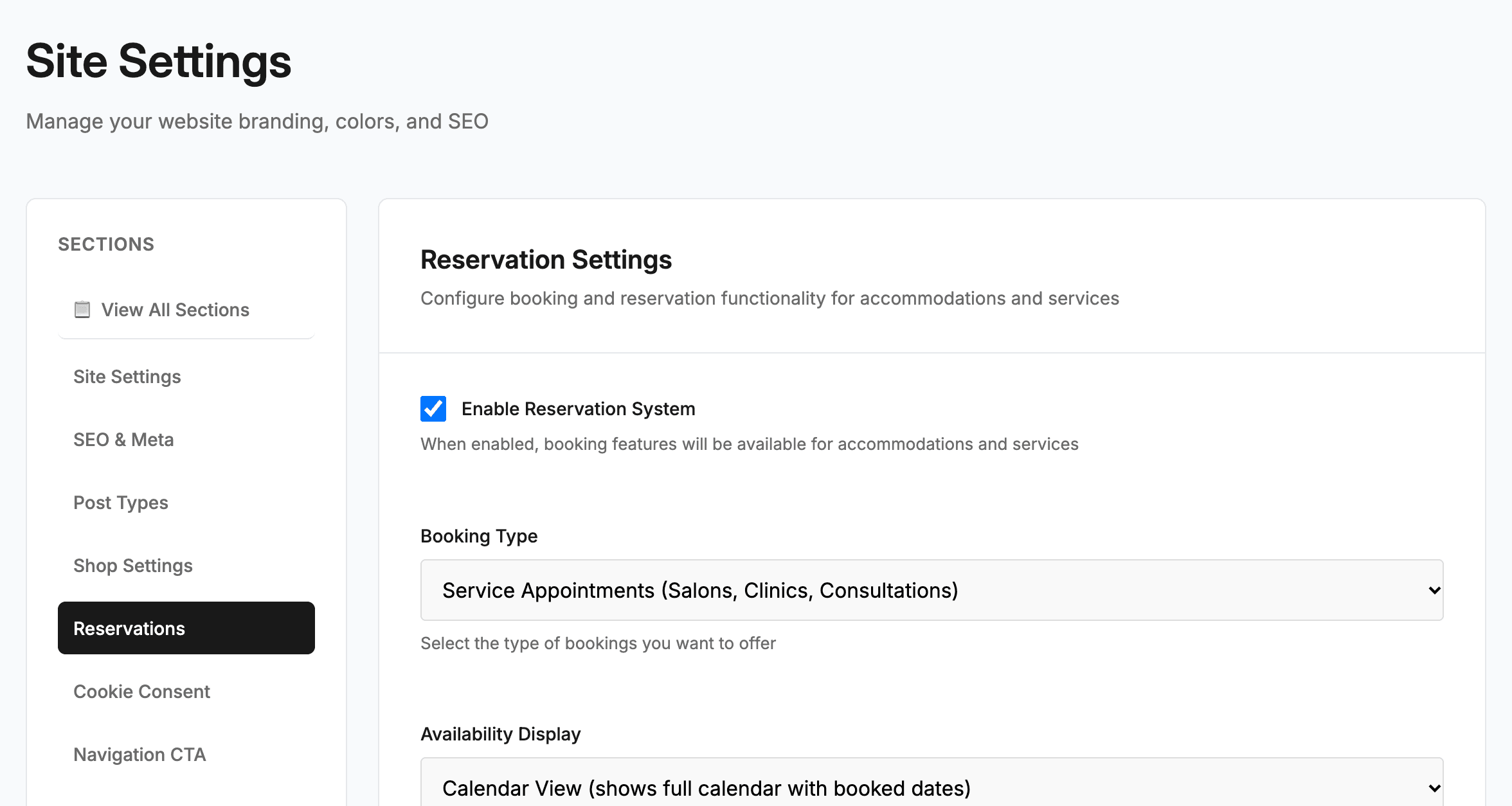
Log in at emit.rs/en/login. In the left menu, under Settings, click Site Settings, then in the Sections menu click Reservations. Scroll to 📅 Calendar Sync (iCal). It only shows when bookings are on and you have at least one unit.
If you don't have a unit yet, start with An apartment booking page from scratch.
Step 1: Export, your site → the platforms
In Export Calendar (Your → OTAs), each unit has its own link.
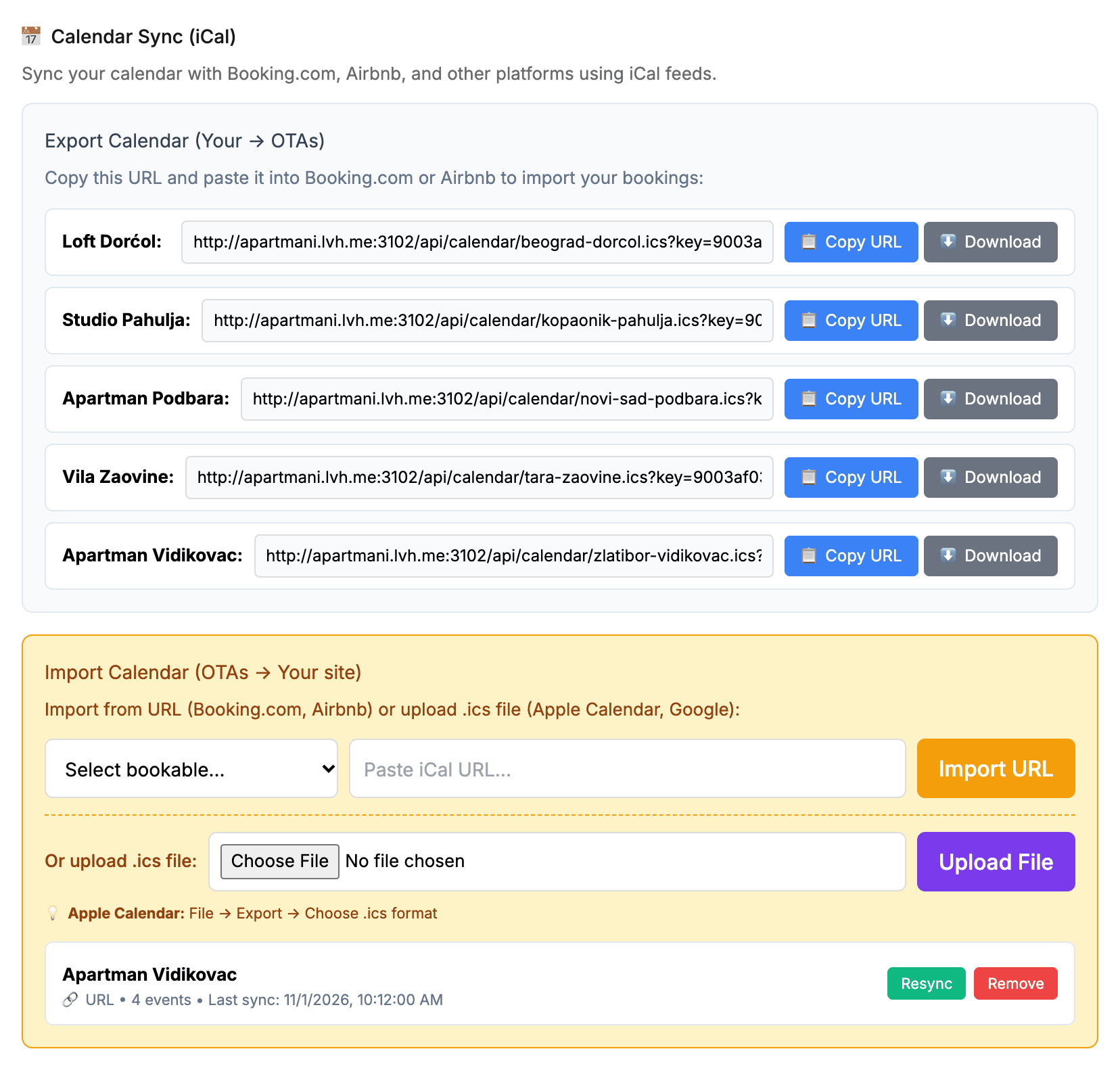
- Next to the unit, click Copy URL.
- On the platform, open the calendar of that same unit and find the option to import a calendar (on Booking.com and Airbnb it's called importing or syncing a calendar).
- Paste the link and save.
From then on the platform reads your calendar periodically and closes the dates you sold directly. How often it reads is up to the platform.
The link contains a secret key. Give it only to platforms; don't publish it.
Step 2: Import, the platforms → your site
- On the platform, in the unit's calendar, find the option to export the calendar and copy the iCal link (it ends in .ics).
- In Import Calendar (OTAs → Your site), choose the same unit in the Select bookable... dropdown.
- Paste the link into Paste iCal URL... and click Import URL.
A row appears below with the unit's name, the number of imported events and the last sync time. From then on the platform's bookings close those dates on your site: guests can't pick them.
Refreshing: Emit re-reads every calendar imported by URL about once an hour on its own, without you clicking anything. The row says "Refreshes automatically about every hour.", and if the last attempt fails (for example the platform is briefly down) a red note appears there; until then the dates from the last successful read stay closed. When you need the current state right now, for example before confirming a booking for a date that was also in demand on the platform, click Resync in that row.
Keep a calendar in another app (e.g. Apple Calendar)? Export it as an .ics file and upload it under Or upload .ics file: with Upload File. That's a snapshot of that moment and doesn't refresh.
Remove disconnects an imported calendar.
Step 3: Repeat for each unit and each platform
The connection is always per unit: Apartman Vidikovac's calendar from Booking.com goes into Apartman Vidikovac, not Vila Zaovine. If you rent one apartment on two platforms, import both calendars and paste your export link into both.
Only when both directions are connected for every unit can the calendars see each other.
What if bookings still overlap
Platforms don't read calendars at the same second. If two guests book the same date in two places a few minutes apart, an overlap is possible. Emit doesn't hide it: in the left menu, Reservations → Bookings, that booking is marked Conflict, and imported bookings are marked External.
When you see a conflict, contact the platform guest or the direct guest as soon as possible and offer another date or another unit.
Bonus: every booking in Google Calendar
The same export link works in Google Calendar, so you see bookings on your phone next to your other plans:
- Next to the unit, click Copy URL.
- In Google Calendar on a computer, click + next to "Other calendars" and choose to add a calendar from a URL.
- Paste the link and confirm.
Google refreshes these calendars on its own, but not instantly, so new bookings may show up with a delay. For the current state, the Bookings screen in Emit is always the one to trust.
In short
- Copy URL for each unit and paste it into the calendar import on each platform.
- Copy the iCal link from each platform and import it into the same unit (Import URL).
- Before confirming in-demand dates, click Resync (otherwise the calendar refreshes itself about every hour).
- Watch for the Conflict label in the bookings list.
- Optionally add the same export link to Google Calendar.
We worked out why direct bookings pay off alongside the platforms in What booking commission really costs.